Software Quality with Engineered test data
What is one important factor in a project’s success? If you are a QA, your answer might be testing — but what makes testing good? Answers vary, yet one thing most of us relate to is good test data.
Bad data does not always mean “wrong values.” It often means too much of the right values, locked in a shared database nobody dares touch.
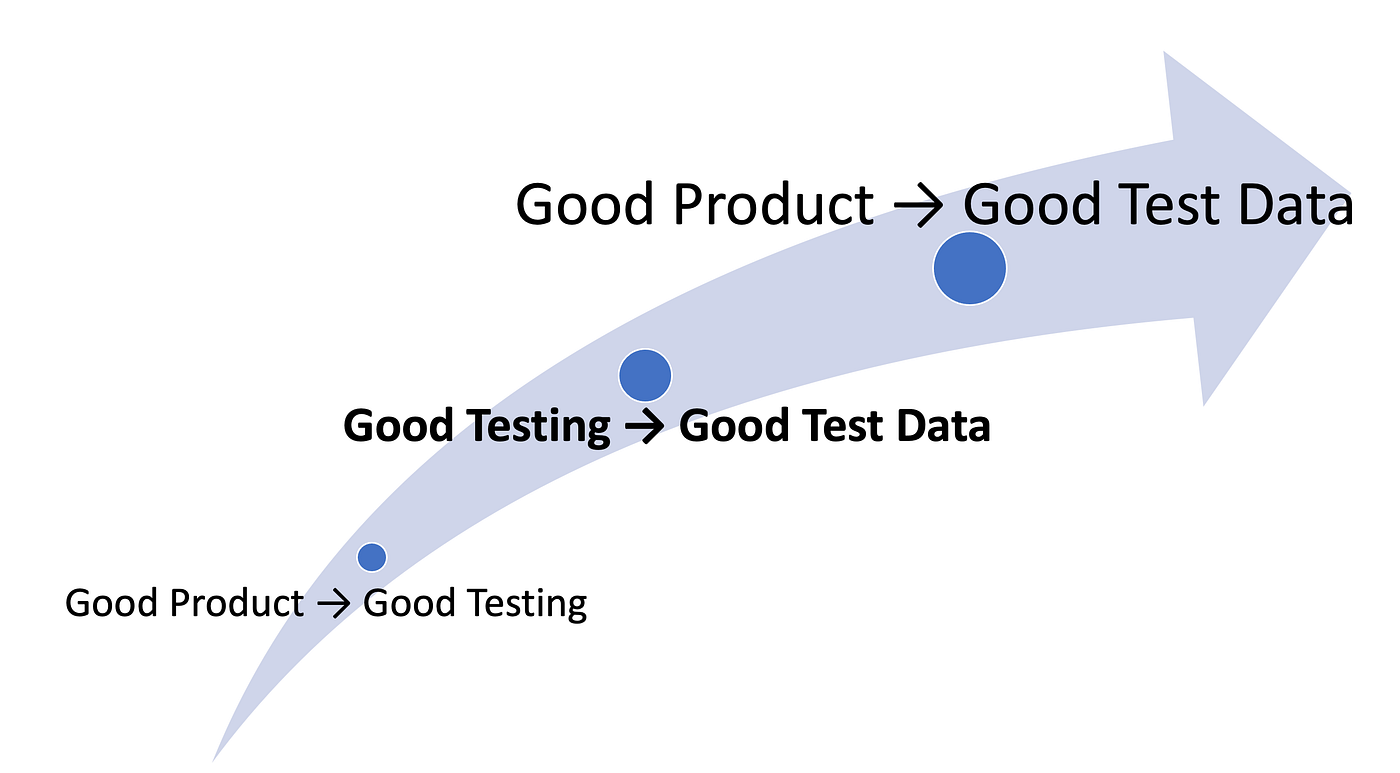
Everyone in software agrees test data matters. So why do we ignore it until a batch job fails at 2 a.m. or automation times out on a million-row join?
For production-alike data in test environments, see ThoughtWorks technology radar blip — useful context, not a mandate to copy prod wholesale.
Common test data problems
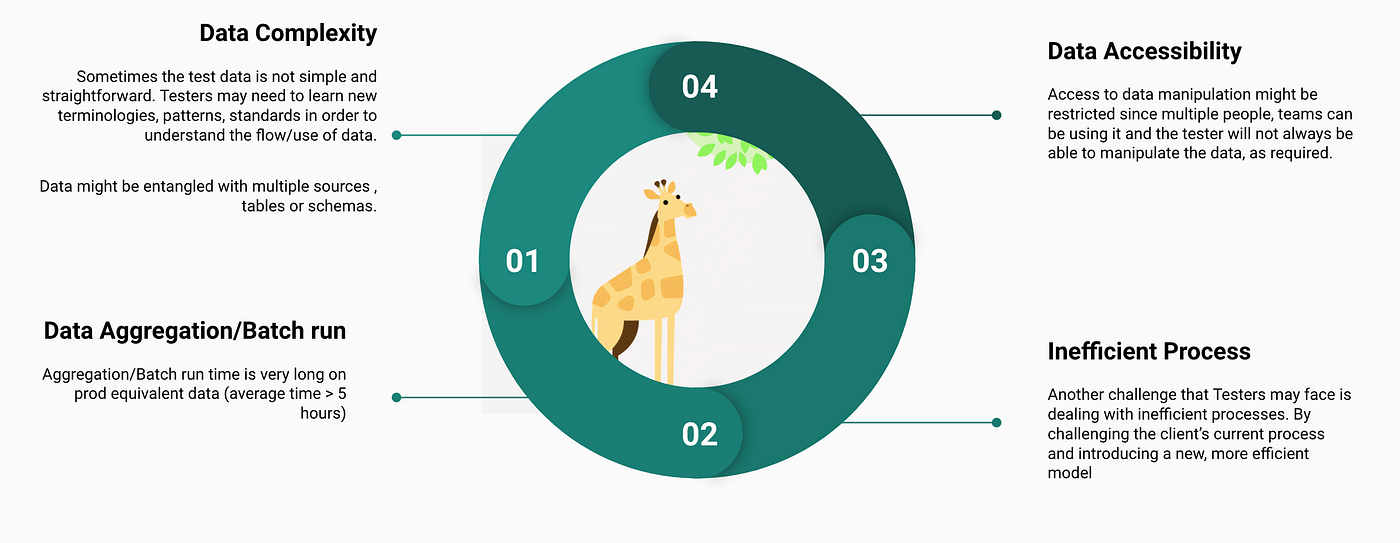
Data aggregation / batch runs
Prod-equivalent volume in lower environments causes:
- Longer batch and aggregation time
- More storage cost
- Uncertainty on corner and edge cases
- Slow validation queries
- Automated tests that timeout or run unacceptably long
Sound familiar? YOUR UI E2E waits on a warehouse sync that prod needs — but QA only needs ten rows to prove the rule.
Data complexity
Production-equivalent data is rarely simple:
- New terminologies, patterns, and standards to learn
- Data entangled across sources, tables, schemas
- Scenarios impossible in test env without engineered subsets
Data accessibility
- Multiple teams share environments — YOU cannot freely mutate data
- Time spent learning DB names, relations, columns, and constraints before changing one row
Inefficient processes
Challenge the current process. Introduce a model where testers get accurate data faster — engineered data in version control, reviewed like code.
What we faced on one project
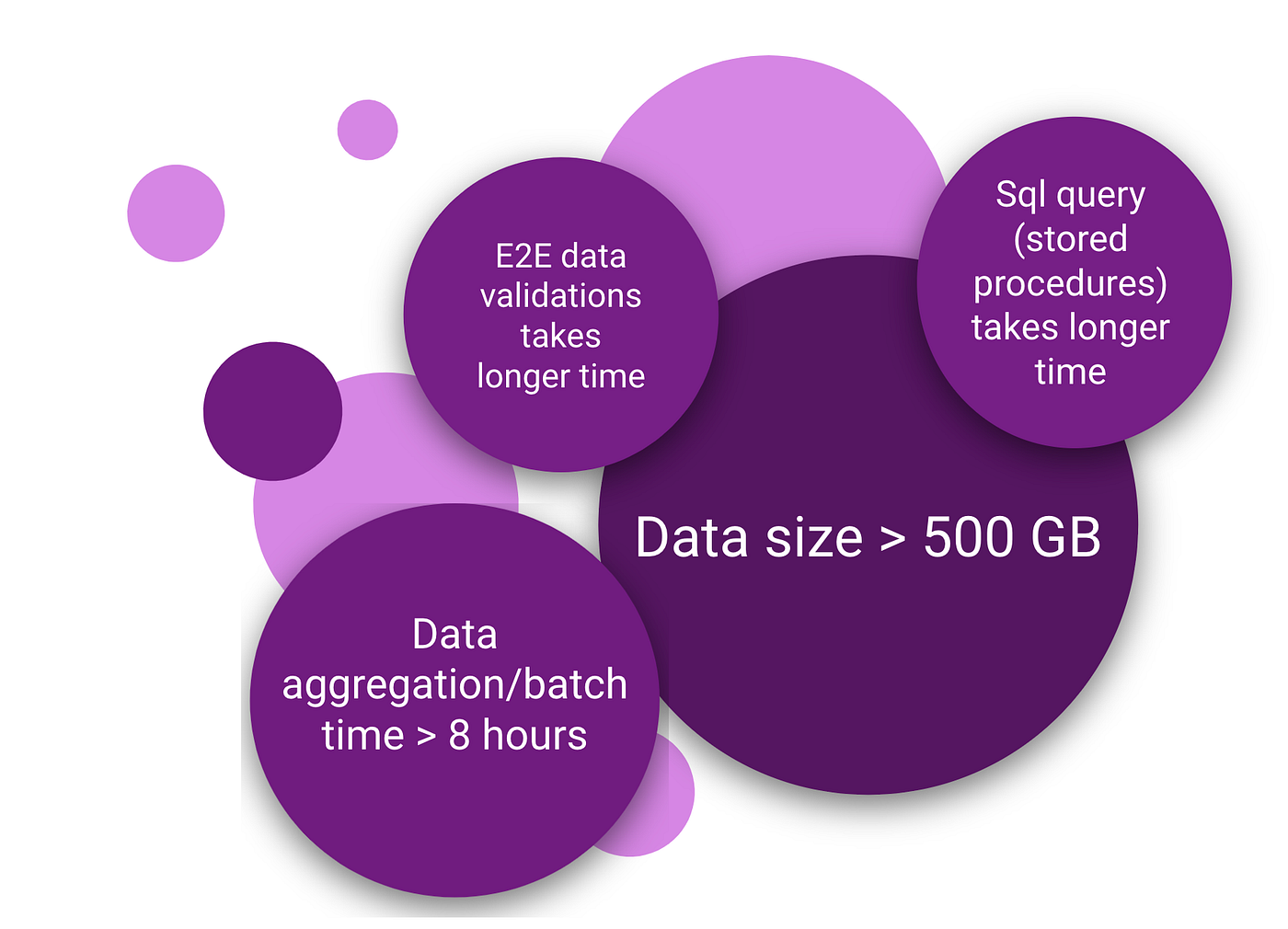
- Prod-equivalent volume on lower environments
- Data size > 500 GB (> 40 interrelated tables, millions of rows)
- Batch processing > 8 hours — one failed run cost a full day of feedback
- Cloud storage cost climbing
- Multiple teams on shared envs — ad hoc changes broke each other’s scenarios
- Views and procedures for UI validation — heavy maintenance, multi-minute queries
We could not test microservices or components fast when the data layer was the bottleneck.
The solution — engineer, do not clone
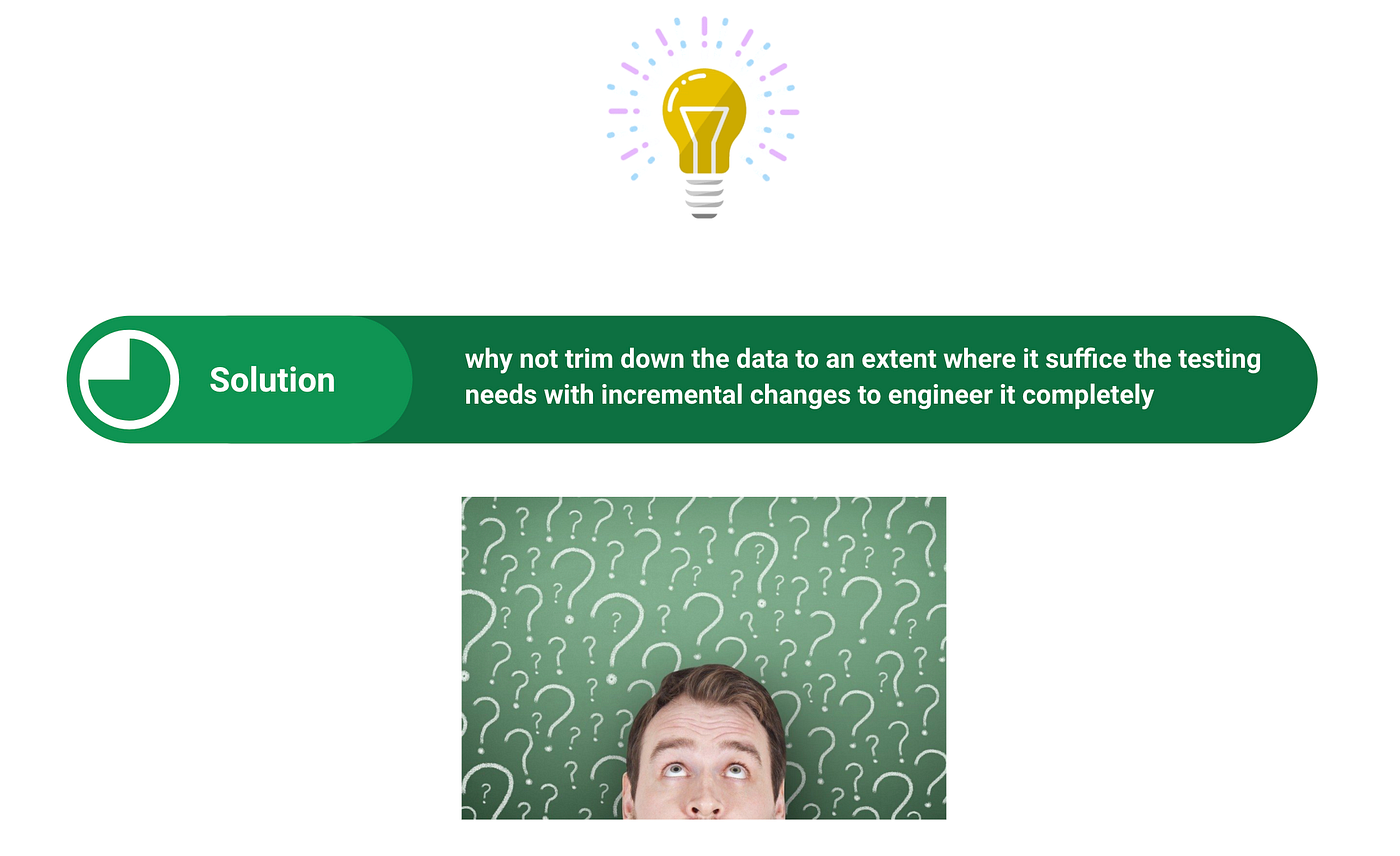
Goals:
- Faster aggregation / batch (faster feedback)
- Faster SQL for manual and automated checks
- Lower cloud storage on Dev, QA, Training
Iterative approach made reduction manageable and built confidence in reduced data reliability.
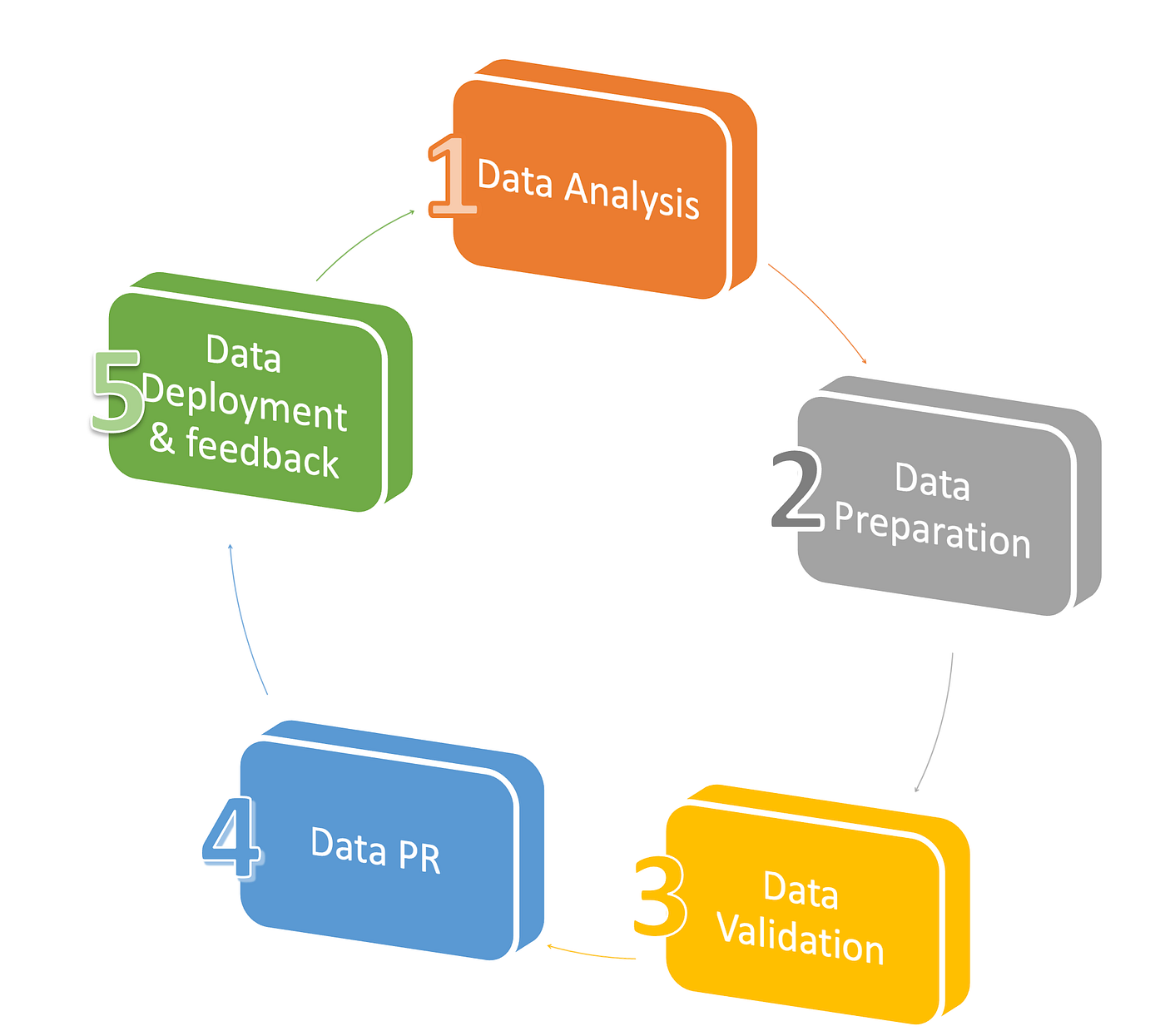
%3btext-align:center%3b%7d%23mermaid-0 .edgeLabel p%7bbackground-color:rgba(232%2c232%2c232%2c 0.8)%3b%7d%23mermaid-0 .edgeLabel rect%7bopacity:0.5%3bbackground-color:rgba(232%2c232%2c232%2c 0.8)%3bfill:rgba(232%2c232%2c232%2c 0.8)%3b%7d%23mermaid-0 .labelBkg%7bbackground-color:rgba(232%2c 232%2c 232%2c 0.5)%3b%7d%23mermaid-0 .cluster rect%7bfill:%23ffffde%3bstroke:%23aaaa33%3bstroke-width:1px%3b%7d%23mermaid-0 .cluster text%7bfill:%23333%3b%7d%23mermaid-0 .cluster span%7bcolor:%23333%3b%7d%23mermaid-0 div.mermaidTooltip%7bposition:absolute%3btext-align:center%3bmax-width:200px%3bpadding:2px%3bfont-family:arial%2csans-serif%3bfont-size:12px%3bbackground:hsl(80%2c 100%25%2c 96.2745098039%25)%3bborder:1px solid %23aaaa33%3bborder-radius:2px%3bpointer-events:none%3bz-index:100%3b%7d%23mermaid-0 .flowchartTitleText%7btext-anchor:middle%3bfont-size:18px%3bfill:%23333%3b%7d%23mermaid-0 rect.text%7bfill:none%3bstroke-width:0%3b%7d%23mermaid-0 .icon-shape%2c%23mermaid-0 .image-shape%7bbackground-color:rgba(232%2c232%2c232%2c 0.8)%3btext-align:center%3b%7d%23mermaid-0 .icon-shape p%2c%23mermaid-0 .image-shape p%7bbackground-color:rgba(232%2c232%2c232%2c 0.8)%3bpadding:2px%3b%7d%23mermaid-0 .icon-shape .label rect%2c%23mermaid-0 .image-shape .label rect%7bopacity:0.5%3bbackground-color:rgba(232%2c232%2c232%2c 0.8)%3bfill:rgba(232%2c232%2c232%2c 0.8)%3b%7d%23mermaid-0 .label-icon%7bdisplay:inline-block%3bheight:1em%3boverflow:visible%3bvertical-align:-0.125em%3b%7d%23mermaid-0 .node .label-icon path%7bfill:currentColor%3bstroke:revert%3bstroke-width:revert%3b%7d%23mermaid-0 .node .neo-node%7bstroke:%239370DB%3b%7d%23mermaid-0 %5bdata-look='neo'%5d.node rect%2c%23mermaid-0 %5bdata-look='neo'%5d.cluster rect%2c%23mermaid-0 %5bdata-look='neo'%5d.node polygon%7bstroke:%239370DB%3bfilter:drop-shadow(1px 2px 2px rgba(185%2c 185%2c 185%2c 1))%3b%7d%23mermaid-0 %5bdata-look='neo'%5d.node path%7bstroke:%239370DB%3bstroke-width:1px%3b%7d%23mermaid-0 %5bdata-look='neo'%5d.node .outer-path%7bfilter:drop-shadow(1px 2px 2px rgba(185%2c 185%2c 185%2c 1))%3b%7d%23mermaid-0 %5bdata-look='neo'%5d.node .neo-line path%7bstroke:%239370DB%3bfilter:none%3b%7d%23mermaid-0 %5bdata-look='neo'%5d.node circle%7bstroke:%239370DB%3bfilter:drop-shadow(1px 2px 2px rgba(185%2c 185%2c 185%2c 1))%3b%7d%23mermaid-0 %5bdata-look='neo'%5d.node circle .state-start%7bfill:black%3b%7d%23mermaid-0 %5bdata-look='neo'%5d.icon-shape .icon%7bfill:%239370DB%3bfilter:drop-shadow(1px 2px 2px rgba(185%2c 185%2c 185%2c 1))%3b%7d%23mermaid-0 %5bdata-look='neo'%5d.icon-shape .icon-neo path%7bstroke:%239370DB%3bfilter:drop-shadow(1px 2px 2px rgba(185%2c 185%2c 185%2c 1))%3b%7d%23mermaid-0 :root%7b--mermaid-font-family:arial%2csans-serif%3b%7d%3c/style%3e%3cg%3e%3cmarker id='mermaid-0_flowchart-v2-pointEnd' class='marker flowchart-v2' viewBox='0 0 10 10' refX='5' refY='5' markerUnits='userSpaceOnUse' markerWidth='8' markerHeight='8' orient='auto'%3e%3cpath d='M 0 0 L 10 5 L 0 10 z' class='arrowMarkerPath' style='stroke-width: 1%3b stroke-dasharray: 1%2c 0%3b'/%3e%3c/marker%3e%3cmarker id='mermaid-0_flowchart-v2-pointStart' class='marker flowchart-v2' viewBox='0 0 10 10' refX='4.5' refY='5' markerUnits='userSpaceOnUse' markerWidth='8' markerHeight='8' orient='auto'%3e%3cpath d='M 0 5 L 10 10 L 10 0 z' class='arrowMarkerPath' style='stroke-width: 1%3b stroke-dasharray: 1%2c 0%3b'/%3e%3c/marker%3e%3cmarker id='mermaid-0_flowchart-v2-pointEnd-margin' class='marker flowchart-v2' viewBox='0 0 11.5 14' refX='11.5' refY='7' markerUnits='userSpaceOnUse' markerWidth='10.5' markerHeight='14' orient='auto'%3e%3cpath d='M 0 0 L 11.5 7 L 0 14 z' class='arrowMarkerPath' style='stroke-width: 0%3b stroke-dasharray: 1%2c 0%3b'/%3e%3c/marker%3e%3cmarker id='mermaid-0_flowchart-v2-pointStart-margin' class='marker flowchart-v2' viewBox='0 0 11.5 14' refX='1' refY='7' markerUnits='userSpaceOnUse' markerWidth='11.5' markerHeight='14' orient='auto'%3e%3cpolygon points='0%2c7 11.5%2c14 11.5%2c0' class='arrowMarkerPath' style='stroke-width: 0%3b stroke-dasharray: 1%2c 0%3b'/%3e%3c/marker%3e%3cmarker id='mermaid-0_flowchart-v2-circleEnd' class='marker flowchart-v2' viewBox='0 0 10 10' refX='11' refY='5' markerUnits='userSpaceOnUse' markerWidth='11' markerHeight='11' orient='auto'%3e%3ccircle cx='5' cy='5' r='5' class='arrowMarkerPath' style='stroke-width: 1%3b stroke-dasharray: 1%2c 0%3b'/%3e%3c/marker%3e%3cmarker id='mermaid-0_flowchart-v2-circleStart' class='marker flowchart-v2' viewBox='0 0 10 10' refX='-1' refY='5' markerUnits='userSpaceOnUse' markerWidth='11' markerHeight='11' orient='auto'%3e%3ccircle cx='5' cy='5' r='5' class='arrowMarkerPath' style='stroke-width: 1%3b stroke-dasharray: 1%2c 0%3b'/%3e%3c/marker%3e%3cmarker id='mermaid-0_flowchart-v2-circleEnd-margin' class='marker flowchart-v2' viewBox='0 0 10 10' refY='5' refX='12.25' markerUnits='userSpaceOnUse' markerWidth='14' markerHeight='14' orient='auto'%3e%3ccircle cx='5' cy='5' r='5' class='arrowMarkerPath' style='stroke-width: 0%3b stroke-dasharray: 1%2c 0%3b'/%3e%3c/marker%3e%3cmarker id='mermaid-0_flowchart-v2-circleStart-margin' class='marker flowchart-v2' viewBox='0 0 10 10' refX='-2' refY='5' markerUnits='userSpaceOnUse' markerWidth='14' markerHeight='14' orient='auto'%3e%3ccircle cx='5' cy='5' r='5' class='arrowMarkerPath' style='stroke-width: 0%3b stroke-dasharray: 1%2c 0%3b'/%3e%3c/marker%3e%3cmarker id='mermaid-0_flowchart-v2-crossEnd' class='marker cross flowchart-v2' viewBox='0 0 11 11' refX='12' refY='5.2' markerUnits='userSpaceOnUse' markerWidth='11' markerHeight='11' orient='auto'%3e%3cpath d='M 1%2c1 l 9%2c9 M 10%2c1 l -9%2c9' class='arrowMarkerPath' style='stroke-width: 2%3b stroke-dasharray: 1%2c 0%3b'/%3e%3c/marker%3e%3cmarker id='mermaid-0_flowchart-v2-crossStart' class='marker cross flowchart-v2' viewBox='0 0 11 11' refX='-1' refY='5.2' markerUnits='userSpaceOnUse' markerWidth='11' markerHeight='11' orient='auto'%3e%3cpath d='M 1%2c1 l 9%2c9 M 10%2c1 l -9%2c9' class='arrowMarkerPath' style='stroke-width: 2%3b stroke-dasharray: 1%2c 0%3b'/%3e%3c/marker%3e%3cmarker id='mermaid-0_flowchart-v2-crossEnd-margin' class='marker cross flowchart-v2' viewBox='0 0 15 15' refX='17.7' refY='7.5' markerUnits='userSpaceOnUse' markerWidth='12' markerHeight='12' orient='auto'%3e%3cpath d='M 1%2c1 L 14%2c14 M 1%2c14 L 14%2c1' class='arrowMarkerPath' style='stroke-width: 2.5%3b'/%3e%3c/marker%3e%3cmarker id='mermaid-0_flowchart-v2-crossStart-margin' class='marker cross flowchart-v2' viewBox='0 0 15 15' refX='-3.5' refY='7.5' markerUnits='userSpaceOnUse' markerWidth='12' markerHeight='12' orient='auto'%3e%3cpath d='M 1%2c1 L 14%2c14 M 1%2c14 L 14%2c1' class='arrowMarkerPath' style='stroke-width: 2.5%3b stroke-dasharray: 1%2c 0%3b'/%3e%3c/marker%3e%3cg class='root'%3e%3cg class='clusters'/%3e%3cg class='edgePaths'%3e%3cpath d='M141.828%2c45.064L145.995%2c43.386C150.161%2c41.709%2c158.495%2c38.355%2c166.161%2c36.677C173.828%2c35%2c180.828%2c35%2c184.328%2c35L187.828%2c35' id='mermaid-0-L_analyze_prepare_0' class='edge-thickness-normal edge-pattern-solid edge-thickness-normal edge-pattern-solid flowchart-link' style='%3b' data-edge='true' data-et='edge' data-id='L_analyze_prepare_0' data-points='W3sieCI6MTQxLjgyODEyNSwieSI6NDUuMDYzNzQ4NDA2Mjg5ODV9LHsieCI6MTY2LjgyODEyNSwieSI6MzV9LHsieCI6MTkxLjgyODEyNSwieSI6MzV9XQ==' data-look='classic' marker-end='url(%23mermaid-0_flowchart-v2-pointEnd)'/%3e%3cpath d='M326.547%2c35L330.714%2c35C334.88%2c35%2c343.214%2c35%2c350.88%2c35C358.547%2c35%2c365.547%2c35%2c369.047%2c35L372.547%2c35' id='mermaid-0-L_prepare_validate_0' class='edge-thickness-normal edge-pattern-solid edge-thickness-normal edge-pattern-solid flowchart-link' style='%3b' data-edge='true' data-et='edge' data-id='L_prepare_validate_0' data-points='W3sieCI6MzI2LjU0Njg3NSwieSI6MzV9LHsieCI6MzUxLjU0Njg3NSwieSI6MzV9LHsieCI6Mzc2LjU0Njg3NSwieSI6MzV9XQ==' data-look='classic' marker-end='url(%23mermaid-0_flowchart-v2-pointEnd)'/%3e%3cpath d='M510.969%2c35L515.135%2c35C519.302%2c35%2c527.635%2c35%2c535.302%2c35C542.969%2c35%2c549.969%2c35%2c553.469%2c35L556.969%2c35' id='mermaid-0-L_validate_pr_0' class='edge-thickness-normal edge-pattern-solid edge-thickness-normal edge-pattern-solid flowchart-link' style='%3b' data-edge='true' data-et='edge' data-id='L_validate_pr_0' data-points='W3sieCI6NTEwLjk2ODc1LCJ5IjozNX0seyJ4Ijo1MzUuOTY4NzUsInkiOjM1fSx7IngiOjU2MC45Njg3NSwieSI6MzV9XQ==' data-look='classic' marker-end='url(%23mermaid-0_flowchart-v2-pointEnd)'/%3e%3cpath d='M699.234%2c35L703.401%2c35C707.568%2c35%2c715.901%2c35%2c723.619%2c36.48C731.337%2c37.96%2c738.44%2c40.919%2c741.991%2c42.399L745.542%2c43.879' id='mermaid-0-L_pr_deploy_0' class='edge-thickness-normal edge-pattern-solid edge-thickness-normal edge-pattern-solid flowchart-link' style='%3b' data-edge='true' data-et='edge' data-id='L_pr_deploy_0' data-points='W3sieCI6Njk5LjIzNDM3NSwieSI6MzV9LHsieCI6NzI0LjIzNDM3NSwieSI6MzV9LHsieCI6NzQ5LjIzNDM3NSwieSI6NDUuNDE3MDMzMjU3MDgyNTJ9XQ==' data-look='classic' marker-end='url(%23mermaid-0_flowchart-v2-pointEnd)'/%3e%3cpath d='M749.234%2c98.583L745.068%2c100.319C740.901%2c102.055%2c732.568%2c105.528%2c712.712%2c107.264C692.857%2c109%2c661.479%2c109%2c630.102%2c109C598.724%2c109%2c567.346%2c109%2c536.289%2c109C505.232%2c109%2c474.495%2c109%2c443.758%2c109C413.021%2c109%2c382.284%2c109%2c351.522%2c109C320.76%2c109%2c289.974%2c109%2c259.188%2c109C228.401%2c109%2c197.615%2c109%2c178.673%2c107.572C159.732%2c106.143%2c152.635%2c103.287%2c149.087%2c101.858L145.539%2c100.43' id='mermaid-0-L_deploy_analyze_0' class='edge-thickness-normal edge-pattern-solid edge-thickness-normal edge-pattern-solid flowchart-link' style='%3b' data-edge='true' data-et='edge' data-id='L_deploy_analyze_0' data-points='W3sieCI6NzQ5LjIzNDM3NSwieSI6OTguNTgyOTY2NzQyOTE3NDh9LHsieCI6NzI0LjIzNDM3NSwieSI6MTA5fSx7IngiOjYzMC4xMDE1NjI1LCJ5IjoxMDl9LHsieCI6NTM1Ljk2ODc1LCJ5IjoxMDl9LHsieCI6NDQzLjc1NzgxMjUsInkiOjEwOX0seyJ4IjozNTEuNTQ2ODc1LCJ5IjoxMDl9LHsieCI6MjU5LjE4NzUsInkiOjEwOX0seyJ4IjoxNjYuODI4MTI1LCJ5IjoxMDl9LHsieCI6MTQxLjgyODEyNSwieSI6OTguOTM2MjUxNTkzNzEwMTV9XQ==' data-look='classic' marker-end='url(%23mermaid-0_flowchart-v2-pointEnd)'/%3e%3c/g%3e%3cg class='edgeLabels'%3e%3cg class='edgeLabel'%3e%3cg class='label' data-id='L_analyze_prepare_0' transform='translate(0%2c 0)'%3e%3cforeignObject width='0' height='0'%3e%3cdiv xmlns='http://www.w3.org/1999/xhtml' class='labelBkg' style='display: table-cell%3b white-space: nowrap%3b line-height: 1.5%3b max-width: 200px%3b text-align: center%3b'%3e%3cspan class='edgeLabel'%3e%3c/span%3e%3c/div%3e%3c/foreignObject%3e%3c/g%3e%3c/g%3e%3cg class='edgeLabel'%3e%3cg class='label' data-id='L_prepare_validate_0' transform='translate(0%2c 0)'%3e%3cforeignObject width='0' height='0'%3e%3cdiv xmlns='http://www.w3.org/1999/xhtml' class='labelBkg' style='display: table-cell%3b white-space: nowrap%3b line-height: 1.5%3b max-width: 200px%3b text-align: center%3b'%3e%3cspan class='edgeLabel'%3e%3c/span%3e%3c/div%3e%3c/foreignObject%3e%3c/g%3e%3c/g%3e%3cg class='edgeLabel'%3e%3cg class='label' data-id='L_validate_pr_0' transform='translate(0%2c 0)'%3e%3cforeignObject width='0' height='0'%3e%3cdiv xmlns='http://www.w3.org/1999/xhtml' class='labelBkg' style='display: table-cell%3b white-space: nowrap%3b line-height: 1.5%3b max-width: 200px%3b text-align: center%3b'%3e%3cspan class='edgeLabel'%3e%3c/span%3e%3c/div%3e%3c/foreignObject%3e%3c/g%3e%3c/g%3e%3cg class='edgeLabel'%3e%3cg class='label' data-id='L_pr_deploy_0' transform='translate(0%2c 0)'%3e%3cforeignObject width='0' height='0'%3e%3cdiv xmlns='http://www.w3.org/1999/xhtml' class='labelBkg' style='display: table-cell%3b white-space: nowrap%3b line-height: 1.5%3b max-width: 200px%3b text-align: center%3b'%3e%3cspan class='edgeLabel'%3e%3c/span%3e%3c/div%3e%3c/foreignObject%3e%3c/g%3e%3c/g%3e%3cg class='edgeLabel' transform='translate(443.7578125%2c 109)'%3e%3cg class='label' data-id='L_deploy_analyze_0' transform='translate(-45.8046875%2c -12)'%3e%3cforeignObject width='91.609375' height='24'%3e%3cdiv xmlns='http://www.w3.org/1999/xhtml' class='labelBkg' style='display: table-cell%3b white-space: nowrap%3b line-height: 1.5%3b max-width: 200px%3b text-align: center%3b'%3e%3cspan class='edgeLabel'%3e%3cp%3enext iteration%3c/p%3e%3c/span%3e%3c/div%3e%3c/foreignObject%3e%3c/g%3e%3c/g%3e%3c/g%3e%3cg class='nodes'%3e%3cg class='node default' id='mermaid-0-flowchart-analyze-0' data-look='classic' transform='translate(74.9140625%2c 72)'%3e%3crect class='basic label-container' style='' x='-66.9140625' y='-27' width='133.828125' height='54'/%3e%3cg class='label' style='' transform='translate(-36.9140625%2c -12)'%3e%3crect/%3e%3cforeignObject width='73.828125' height='24'%3e%3cdiv xmlns='http://www.w3.org/1999/xhtml' style='display: table-cell%3b white-space: nowrap%3b line-height: 1.5%3b max-width: 200px%3b text-align: center%3b'%3e%3cspan class='nodeLabel'%3e%3cp%3e1. Analyze%3c/p%3e%3c/span%3e%3c/div%3e%3c/foreignObject%3e%3c/g%3e%3c/g%3e%3cg class='node default' id='mermaid-0-flowchart-prepare-1' data-look='classic' transform='translate(259.1875%2c 35)'%3e%3crect class='basic label-container' style='' x='-67.359375' y='-27' width='134.71875' height='54'/%3e%3cg class='label' style='' transform='translate(-37.359375%2c -12)'%3e%3crect/%3e%3cforeignObject width='74.71875' height='24'%3e%3cdiv xmlns='http://www.w3.org/1999/xhtml' style='display: table-cell%3b white-space: nowrap%3b line-height: 1.5%3b max-width: 200px%3b text-align: center%3b'%3e%3cspan class='nodeLabel'%3e%3cp%3e2. Prepare%3c/p%3e%3c/span%3e%3c/div%3e%3c/foreignObject%3e%3c/g%3e%3c/g%3e%3cg class='node default' id='mermaid-0-flowchart-validate-2' data-look='classic' transform='translate(443.7578125%2c 35)'%3e%3crect class='basic label-container' style='' x='-67.2109375' y='-27' width='134.421875' height='54'/%3e%3cg class='label' style='' transform='translate(-37.2109375%2c -12)'%3e%3crect/%3e%3cforeignObject width='74.421875' height='24'%3e%3cdiv xmlns='http://www.w3.org/1999/xhtml' style='display: table-cell%3b white-space: nowrap%3b line-height: 1.5%3b max-width: 200px%3b text-align: center%3b'%3e%3cspan class='nodeLabel'%3e%3cp%3e3. Validate%3c/p%3e%3c/span%3e%3c/div%3e%3c/foreignObject%3e%3c/g%3e%3c/g%3e%3cg class='node default' id='mermaid-0-flowchart-pr-3' data-look='classic' transform='translate(630.1015625%2c 35)'%3e%3crect class='basic label-container' style='' x='-69.1328125' y='-27' width='138.265625' height='54'/%3e%3cg class='label' style='' transform='translate(-39.1328125%2c -12)'%3e%3crect/%3e%3cforeignObject width='78.265625' height='24'%3e%3cdiv xmlns='http://www.w3.org/1999/xhtml' style='display: table-cell%3b white-space: nowrap%3b line-height: 1.5%3b max-width: 200px%3b text-align: center%3b'%3e%3cspan class='nodeLabel'%3e%3cp%3e4. Data PR%3c/p%3e%3c/span%3e%3c/div%3e%3c/foreignObject%3e%3c/g%3e%3c/g%3e%3cg class='node default' id='mermaid-0-flowchart-deploy-4' data-look='classic' transform='translate(813.03125%2c 72)'%3e%3crect class='basic label-container' style='' x='-63.796875' y='-27' width='127.59375' height='54'/%3e%3cg class='label' style='' transform='translate(-33.796875%2c -12)'%3e%3crect/%3e%3cforeignObject width='67.59375' height='24'%3e%3cdiv xmlns='http://www.w3.org/1999/xhtml' style='display: table-cell%3b white-space: nowrap%3b line-height: 1.5%3b max-width: 200px%3b text-align: center%3b'%3e%3cspan class='nodeLabel'%3e%3cp%3e5. Deploy%3c/p%3e%3c/span%3e%3c/div%3e%3c/foreignObject%3e%3c/g%3e%3c/g%3e%3c/g%3e%3c/g%3e%3c/g%3e%3cdefs%3e%3cfilter id='mermaid-0-drop-shadow' height='130%25' width='130%25'%3e%3cfeDropShadow dx='4' dy='4' stdDeviation='0' flood-opacity='0.06' flood-color='black'/%3e%3c/filter%3e%3c/defs%3e%3cdefs%3e%3cfilter id='mermaid-0-drop-shadow-small' height='150%25' width='150%25'%3e%3cfeDropShadow dx='2' dy='2' stdDeviation='0' flood-opacity='0.06' flood-color='black'/%3e%3c/filter%3e%3c/defs%3e%3c/svg%3e)
Step 1 — Data analysis
Consider a patient health management DB — row counts in the millions. Do we need millions of patient records to validate the system?
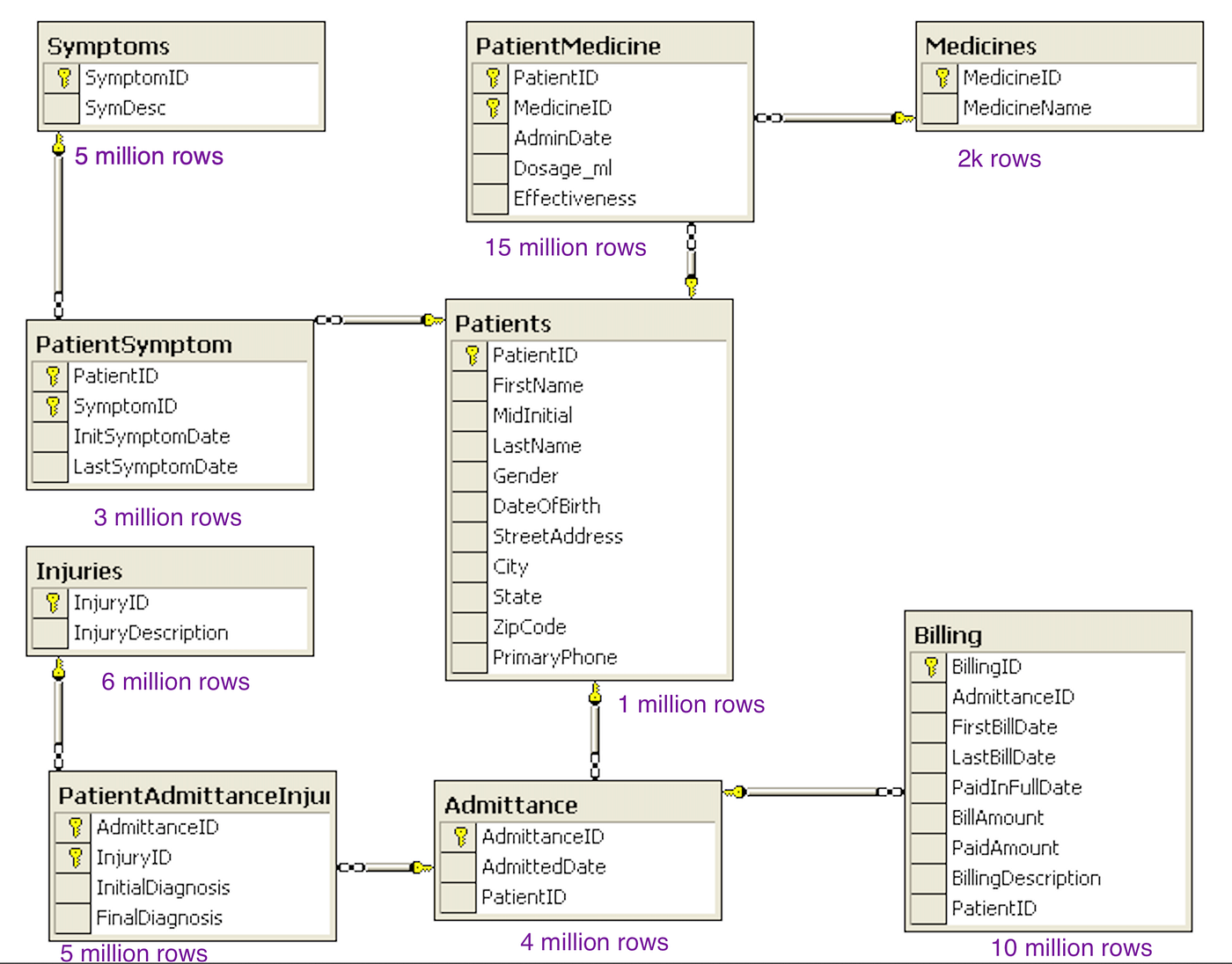
- Analyze existing data, types, and application impact
- Map joins and interconnectivity
- Set target reduced size (KB/MB or row counts per table)
- Remember source control limits — e.g. Git diff limits (~1 MB / 20k lines for readable diffs)
Step 2 — Data preparation
- List data scenarios and corner cases
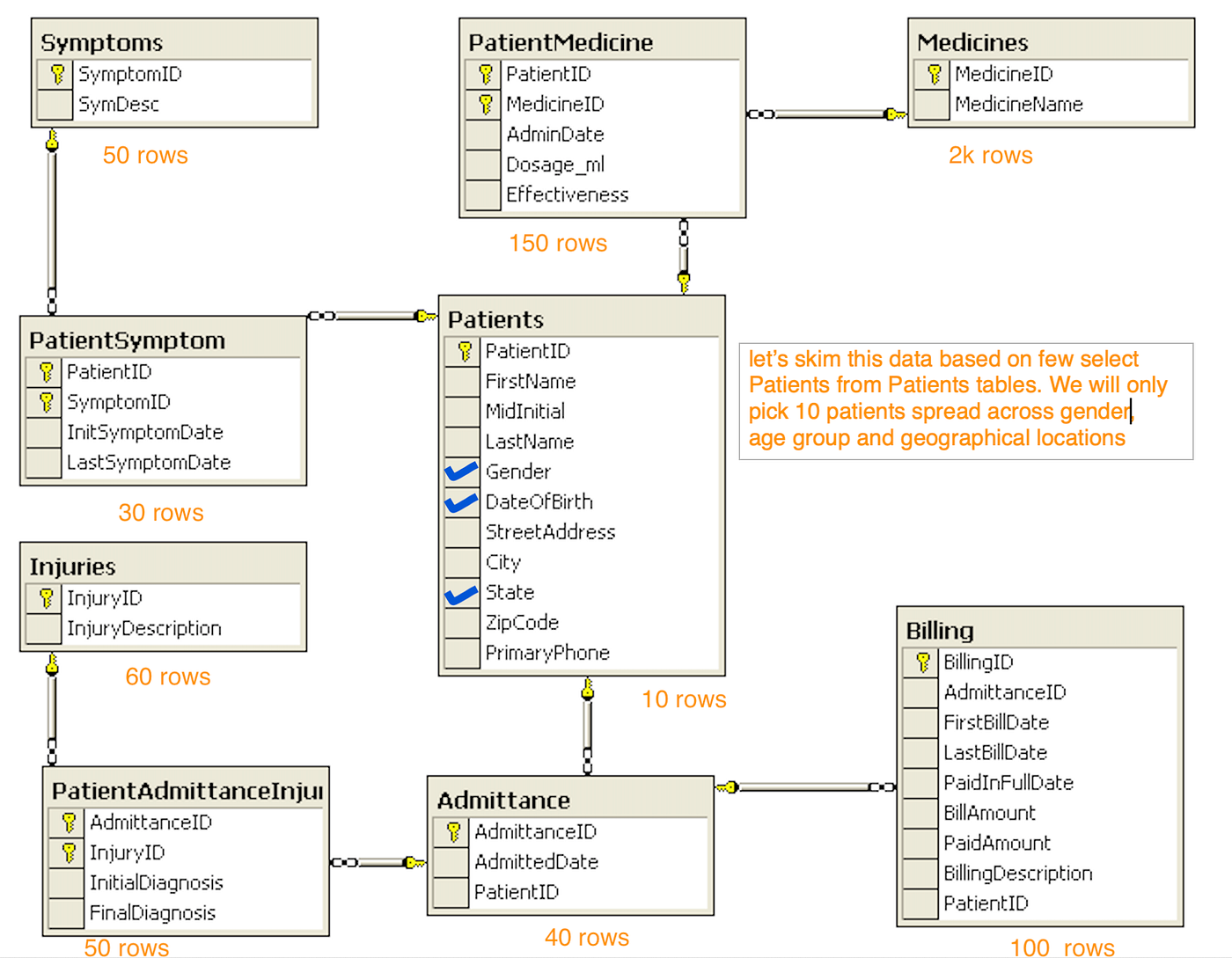
- Data skimming chain — ~10 patients across gender, age, geography may suffice
- Follow the chain for those patients through related tables
- Skim dependent tables consistently
Alternatively, TABLESAMPLE can pick random rows — use with care on join keys.
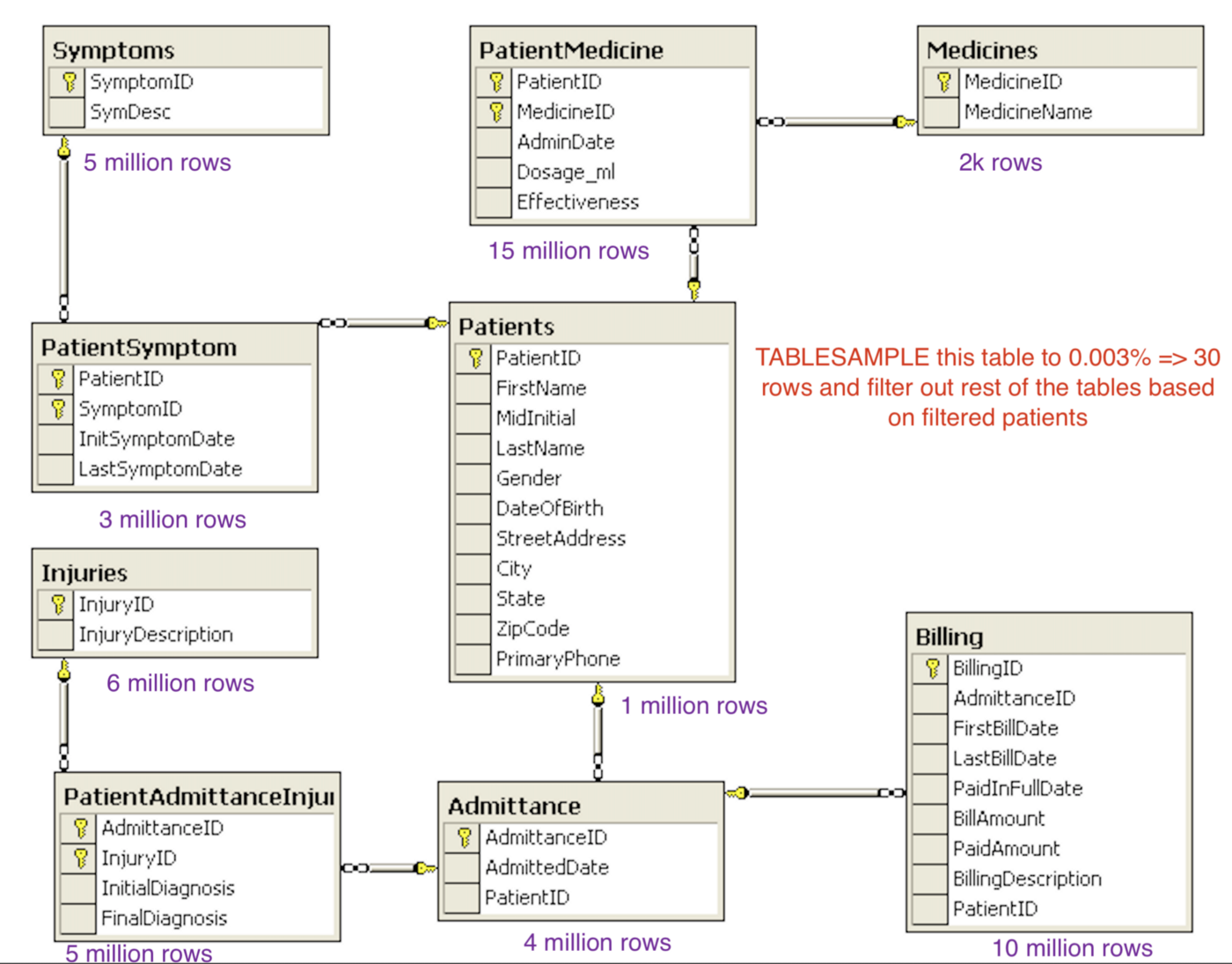
- Preserve join keys across skimmed tables
- Note duplicate business rows you may collapse or update for edge cases
Step 3 — Data validation
- Dump to a trial test DB
- Local or Docker app against test DB
- Manual sanity on coverage and edge cases
- Run automation for integrity and compatibility
- Be patient — iterative; this step takes time
- Watch Git tracking limits on large SQL dumps
Step 4 — Data PR
After satisfactory validation:
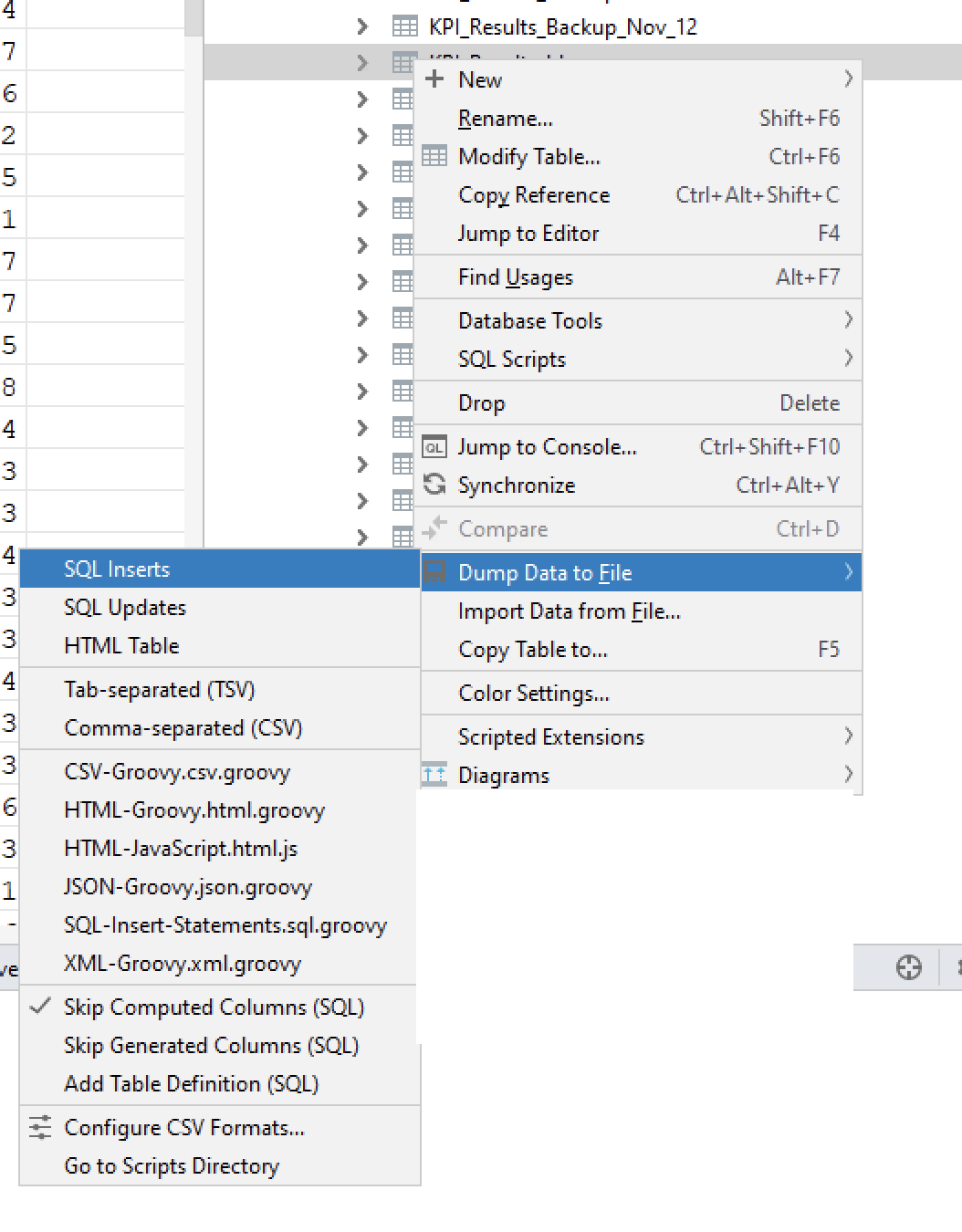
- Track changes in Git; keep files reviewable
- Export as
.sqlinsert scripts
If files exceed diff limits, batch inserts with awk — example pattern:
awk 'BEGIN{match_count=0;} $0~/^INSERT.*VALUES \(/{match_count++;if (match_count%1000!=1) gsub("INSERT INTO .* VALUES \\(","(", $0); if (match_count%1000!=0) gsub(";$",",", $0); print $0}' input.sql > output.sql


Raise a Data PR — stakeholders review data changes like schema changes.
Step 5 — Data deployment
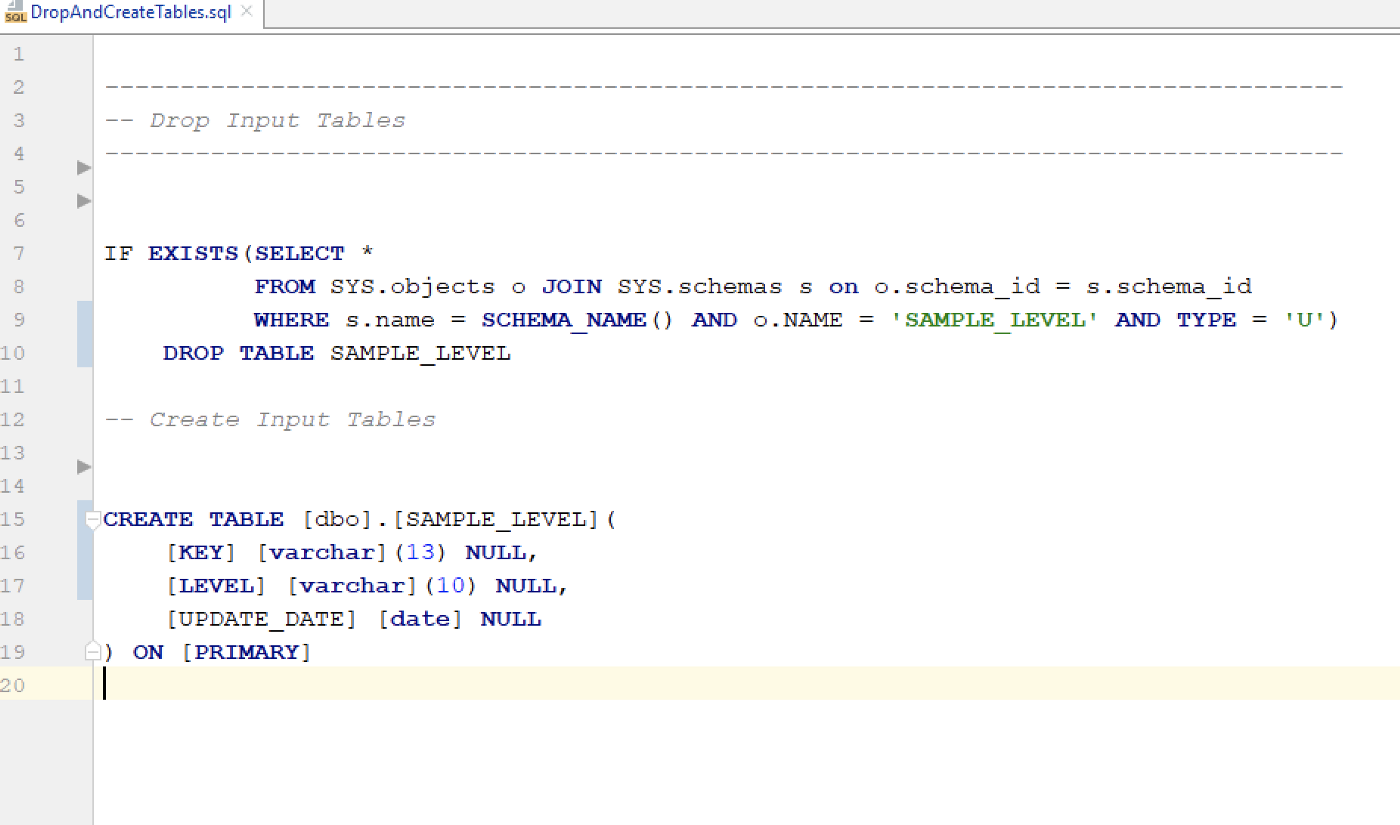
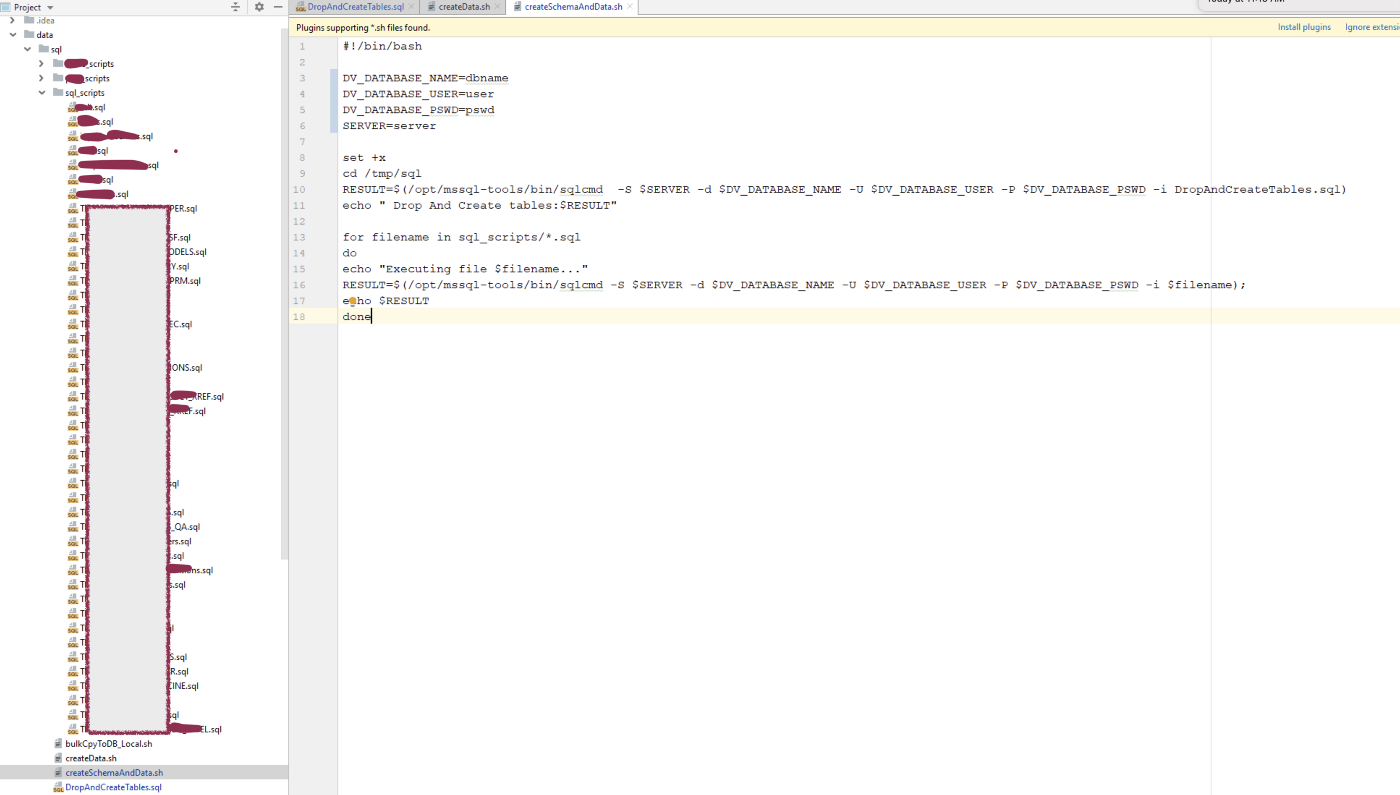
Deploy via scripts — e.g. createSchemaAndData.sh, DropAndCreateTable.sql:

Repository layout example:
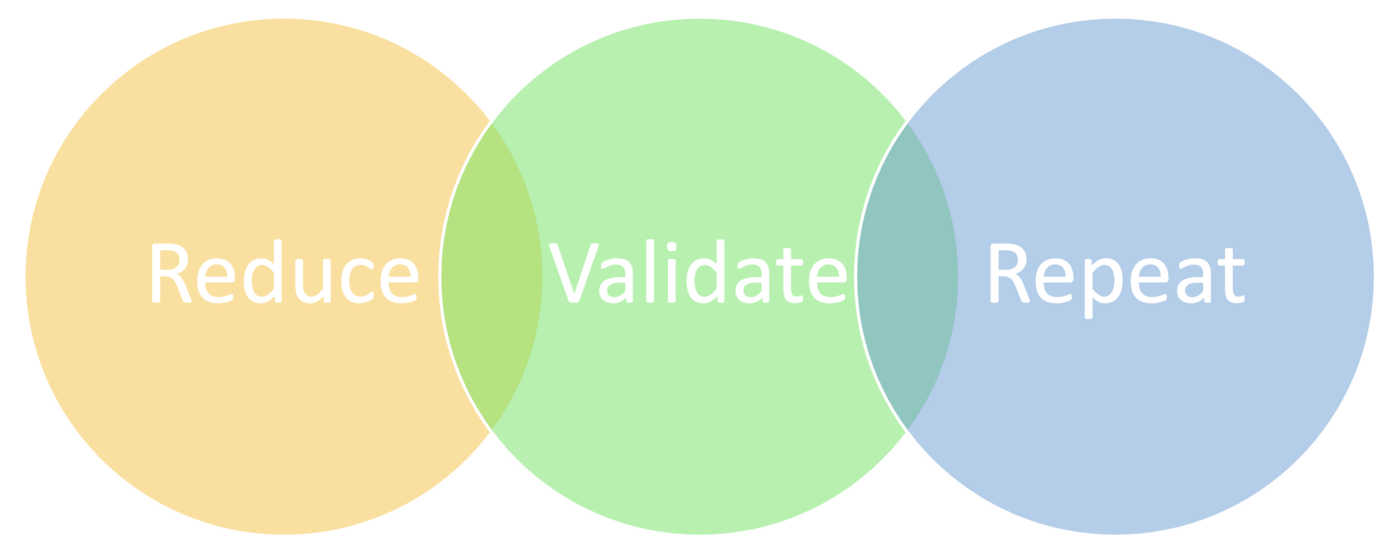
Major steps summary:
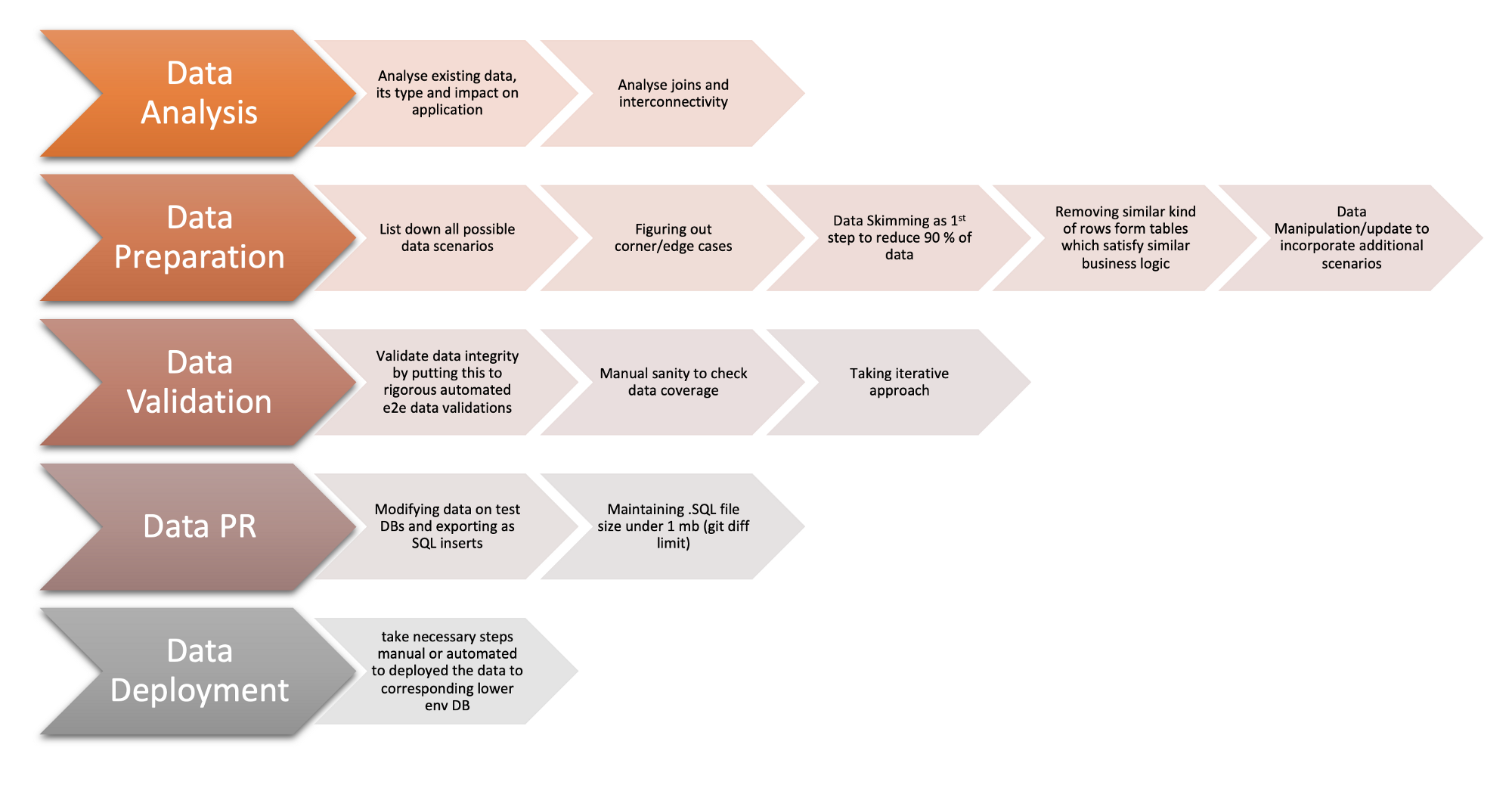
Iteration cycle:
Final outcome
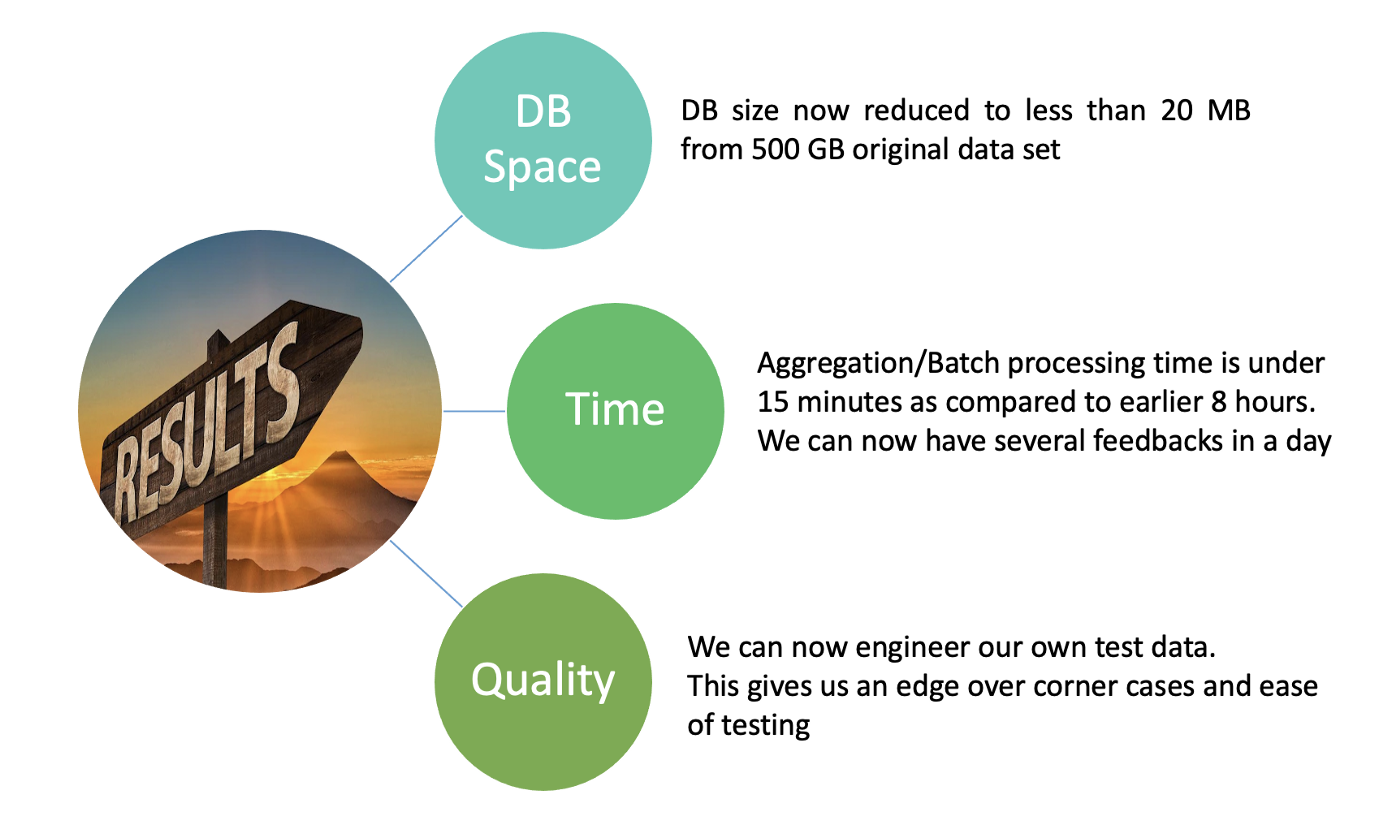
- DB size < 20 MB vs 500 GB (~500,000 MB)
- Batch processing < 15 minutes vs 8 hours — multiple feedback cycles per day
- Cloud storage cost down for Dev, QA, Training
- Teams work in parallel with change management and approvals, zero-downtime deploys
- Complex views and procedures run in under a second vs minutes
Those numbers unlocked the test pyramid we wanted — API and component tests could run without apologizing for data.
Steps for the future
Documenting: Quick fact sheets — glossaries, key queries, procedures — for onboarding without reading the entire wiki.
Data management: As teams grow, formalize ownership: who approves data PRs, how often you refresh subsets, how automation seeds fixtures.
Test data preparation is critical to quality assurance. Forethought, creativity, and industry practices beat copying prod and hoping.
YOUR next move
Pick one table that dominates storage in YOUR lower env. What is the smallest row set that still tells the truth about one business rule?
Happy Testing :)
Comments
Comments are hosted by Disqus. The free tier may show sponsored content.